Website SEO Audit
Check any page the way Google sees it: meta tags, headings, content and keywords, images, links, indexability, speed and security.
SEO Report
Fix these first
Google search preview
Social share preview
WhatsApp · LinkedIn · FacebookCore Web Vitals assessment
Other speed metrics
All checks
No checks match these filters.
Results for
Why it matters
How to fix
Free website
SEO checker.
Run a free SEO audit on any page and get a clear list of what to fix first — in under a minute.
This SEO audit tool fetches your page as Googlebot, runs 70 on-page, technical, speed and social checks across 15 areas, and gives the page an SEO score out of 100 with a letter grade. Every issue comes with why it matters and how to fix it, and the full report can be shared or downloaded as a PDF. Jump to how it works, what it checks or the FAQ.
How to run a
website SEO audit.
Paste a URL, read the score, fix what matters — then share the report. Five steps, about a minute.
-
01Step 1 of 5
Paste your page URL
Enter any public page — your homepage, a service page or a blog post. The audit fetches it the way Googlebot does, so you see what Google sees, not what your browser cache shows.
- Works with or without https://
- Add a target keyword to check how well the page targets it
- Need every page at once? Use the SEO Spider
-
02Step 2 of 5
Pick the audit type and device
Run the full SEO audit with all 70 checks, or focus on one area — on-page, technical, speed & Core Web Vitals, or social. Mobile is the default because Google indexes the mobile version first.
- FULL — every check in one report
- PAGE · TECH · SPEED · SOCIAL — faster, focused audits
- Switch to Desktop to compare both
-
03Step 3 of 5
Read your SEO score
One SEO score out of 100 with a grade (A to F), plus passed checks, warnings, errors and a separate score for all 15 areas — from title & meta tags to Core Web Vitals. The quickest answer to “is my website SEO friendly?”.
- Errors block rankings or indexing — fix them first
- Warnings are missed opportunities
- Page facts: status, response time, HTML size, words, links, requests, page weight
-
04Step 4 of 5
Fix the highest-impact issues
Fix these first sorts every problem by impact and shows how many points each fix adds to your score. Open any check to see why it matters, how to fix it, and a ready-to-copy code snippet for your <head>.
- Filter all 70 checks by status, impact and area, or search them
- See the <head> source exactly as served
- Copy fixed meta, canonical or schema code
-
05Step 5 of 5
Share or download the report
Every audit becomes a shareable SEO report. Send the link to a client or developer, export all checks to CSV, or download a clean, multi-page PDF SEO audit report. Pushed a fix? Hit Re-check.
- Share link opens without a login
- CSV for spreadsheets and task lists
- PDF SEO audit report for clients
One audit.
Every SEO signal.
An on-page SEO checker and a technical SEO audit tool in a single report.
checks, 15 areas, one score.
The same things Google looks at — from crawlability and canonical tags to Core Web Vitals and Open Graph — checked together, so nothing slips through.
Title & meta tags
Title length and keyword, meta description, charset, favicon and duplicate tags.
Headings
One clear H1, logical heading order and your keyword in the headings.
Content & keywords
Word count, text-to-HTML ratio, keyword in the first paragraph, stuffing and readability.
Images
Alt text, width and height, modern formats like WebP/AVIF and lazy loading.
Links
Internal and external links, broken links, empty anchors and anchor text.
Indexability
HTTP status, robots meta, X-Robots-Tag, canonical, robots.txt, XML sitemap and redirects.
Structured data
Valid JSON-LD for rich results, plus HTML lang and hreflang for multilingual sites.
Speed & Core Web Vitals
LCP, TBT and CLS plus FCP, TTFB and Speed Index, compression, caching and page weight.
Mobile friendly
Viewport tag, readable font size and tap targets big enough for a thumb.
Security & SSL
HTTPS, valid SSL certificate, mixed content, HSTS and security headers.
Open Graph & Twitter
og:title, og:image and Twitter / X cards with a live WhatsApp, LinkedIn and Facebook preview.
Some checks go deeper with a dedicated tool: test redirects and status codes with the HTTP Status Checker, certificate problems with the SSL Server Test, and validate schema markup in the JSON Beautifier.
A report you can
send to anyone.
Not a wall of numbers — a prioritised fix list with the code to fix it.
Agencies use it as a free SEO report generator for client pitches, developers as a pre-launch checklist, and site owners to see exactly why a page is not ranking.
- Score & gradeOne SEO score out of 100, a letter grade and a score for all 15 areas.
- Fix these firstIssues sorted by impact, with the points each fix adds to your score.
- Page factsStatus, response time, HTML size, word count, links, compression, requests and page weight.
- Google & social previewSee your snippet on mobile and desktop, and your link card on WhatsApp, LinkedIn and Facebook.
- Core Web VitalsLCP, TBT and CLS with pass or fail, plus FCP, TTFB and Speed Index — mobile and desktop.
- How to fix + codeWhy it matters, the fix, and a snippet you can copy into your <head>.
- Share · CSV · PDFSend a link, export to a spreadsheet, or download a branded multi-page PDF SEO audit report.
Audit the whole site
with the SEO Spider.
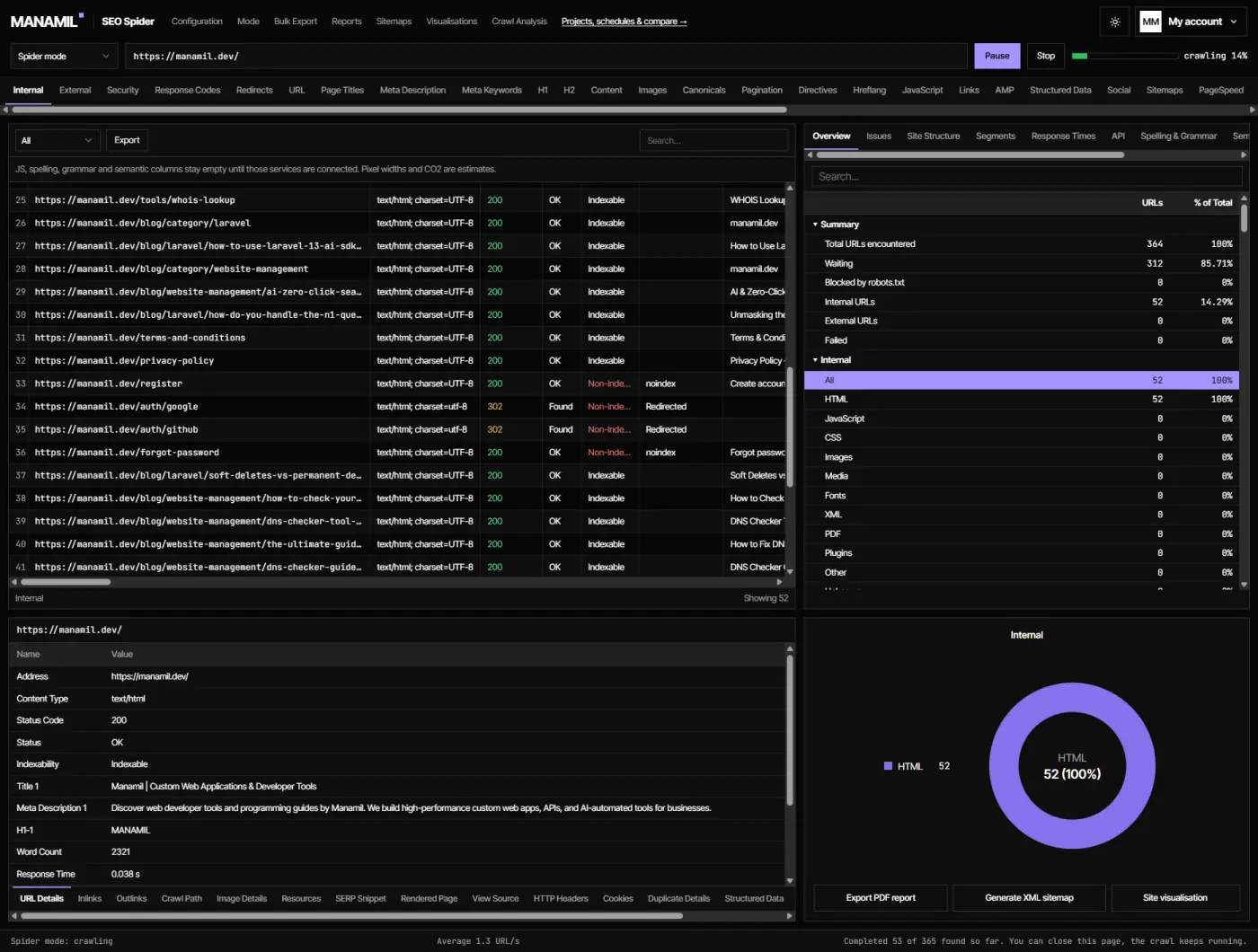
One page tells you a lot. A crawl tells you everything. The Manamil SEO Spider is an online website crawler that works just like the Screaming Frog SEO Spider — it starts at your homepage, follows every internal link and audits every URL it finds. No download, no licence key: log in and crawl from your browser.
SEO Audit THIS PAGE · NO SIGN-UP
- Scope
- One URL, in depth
- Best for
- Optimising a page for a keyword
- Finds
- Meta, headings, content, speed, schema
- Core Web Vitals
- Yes — mobile & desktop
- Report
- Share link, CSV, PDF
- Account
- No sign-up
SEO Spider FREE LOGIN
- Scope
- Every URL on the site
- Best for
- Site-wide technical SEO
- Finds
- Broken links, redirect chains, duplicates
- Core Web Vitals
- Response time per URL
- Report
- Filter and export the crawl
- Account
- Free login
Why the audit
works in this order.
Google handles every page in four stages. A problem early on blocks everything after it.
Crawl
Can Google reach it?Status code, redirects and robots.txt decide if Googlebot can even fetch the page.
Render
What is on the page?Google loads HTML, CSS and JS. Slow servers and heavy scripts delay it — that is what Core Web Vitals measure.
Index
Is it allowed in search?A noindex tag, a canonical to another URL or a duplicate can keep a working page out of Google.
Rank
Is it the best answer?Only now do title, headings, content and internal links matter. Fix the first three stages first.
Built for people
who ship websites.
Agencies & freelancers
Run a free SEO audit before a sales call and send the PDF report as a pitch.
Our SEO & dev servicesDevelopers
Check every page before launch — meta, canonicals, schema and speed in one pass.
Check redirects tooBusiness owners
Find out in plain English why a page is not ranking and what to fix first.
Get it fixed for youBloggers & marketers
Test each post against its target keyword before you hit publish.
Read the SEO blogWhat is an SEO audit tool?
+
An SEO audit tool scans a web page and checks everything that affects how search engines crawl, index and rank it — meta tags, headings, content, images, links, speed, mobile-friendliness and security. This tool runs 70 of those checks across 15 areas and turns them into one score, a grade and a fix list.
Is this SEO audit really free — no sign-up?
+
Yes. The single-page website SEO audit is free with no sign-up and no login. You only need a free account for the SEO Spider, which crawls entire websites.
How do I check my website’s SEO score?
+
Paste your URL at the top of this page, keep “Full SEO audit” selected and press Run SEO Audit. Your SEO score out of 100 and grade appear at the top of the report, followed by passed checks, warnings, errors and a score for each of the 15 areas.
How do I know if my website is SEO friendly?
+
A page is SEO friendly when Google can crawl and index it, it loads fast on mobile, and its title, headings and content clearly match what people search for. A score above 80 (grade B or better) with no errors is a good sign; any red error is worth fixing first.
Can I download the SEO audit report as a PDF?
+
Yes. Every report has Share, CSV and PDF buttons. The multi-page PDF report includes your score, grade, page facts, fix list and every check, ready to send to a client or your team, and the share link opens the same report without a login.
What is the difference between the SEO audit and the SEO Spider?
+
The SEO audit checks one page in depth. The SEO Spider is a website crawler: it follows every internal link and audits all pages together, which is how you find broken links, duplicate titles and redirect chains across a whole site.
Is the SEO Spider a Screaming Frog alternative?
+
It works the same way as Screaming Frog’s SEO Spider — crawl a site, then filter URLs by status code, titles, meta, headings, canonicals and more — but it runs online in your browser, so there is nothing to install. Log in to your free Manamil account to use it.
How often should you do an SEO audit?
+
Run a quick audit on any page you publish or change, and a full site crawl at least once a month. Also audit after a redesign, a migration, a CMS or theme update, or a sudden drop in traffic.
How long does an SEO audit take?
+
A single-page audit usually finishes in under a minute — most of the time is spent collecting Google speed data. A full site crawl with the SEO Spider depends on how many pages the site has.
Why is the mobile score different from desktop?
+
Google measures speed separately for each device, and phones have slower CPUs and networks. Because Google uses mobile-first indexing, the mobile result is the one that matters most for rankings.
Keep going
with these tools.
Found issues you don’t have time to fix?
Manamil Dev is a web development agency. Send us your report — we fix technical SEO, speed and Core Web Vitals on Laravel, WordPress and custom sites.
More SEO and Laravel guides on the Manamil blog · See sites we have built in our work.